

Scheduling, retention, and learning steps
Open a set's gear button and choose Scheduling Algorithm to control how learning steps and longer review intervals are scheduled.
Settings reference
Steps must be the same length as or longer than the preceding step, comparing the actual durations. For example, 10 minutes followed by 1 hour is valid; 2 hours followed by 30 minutes is not.
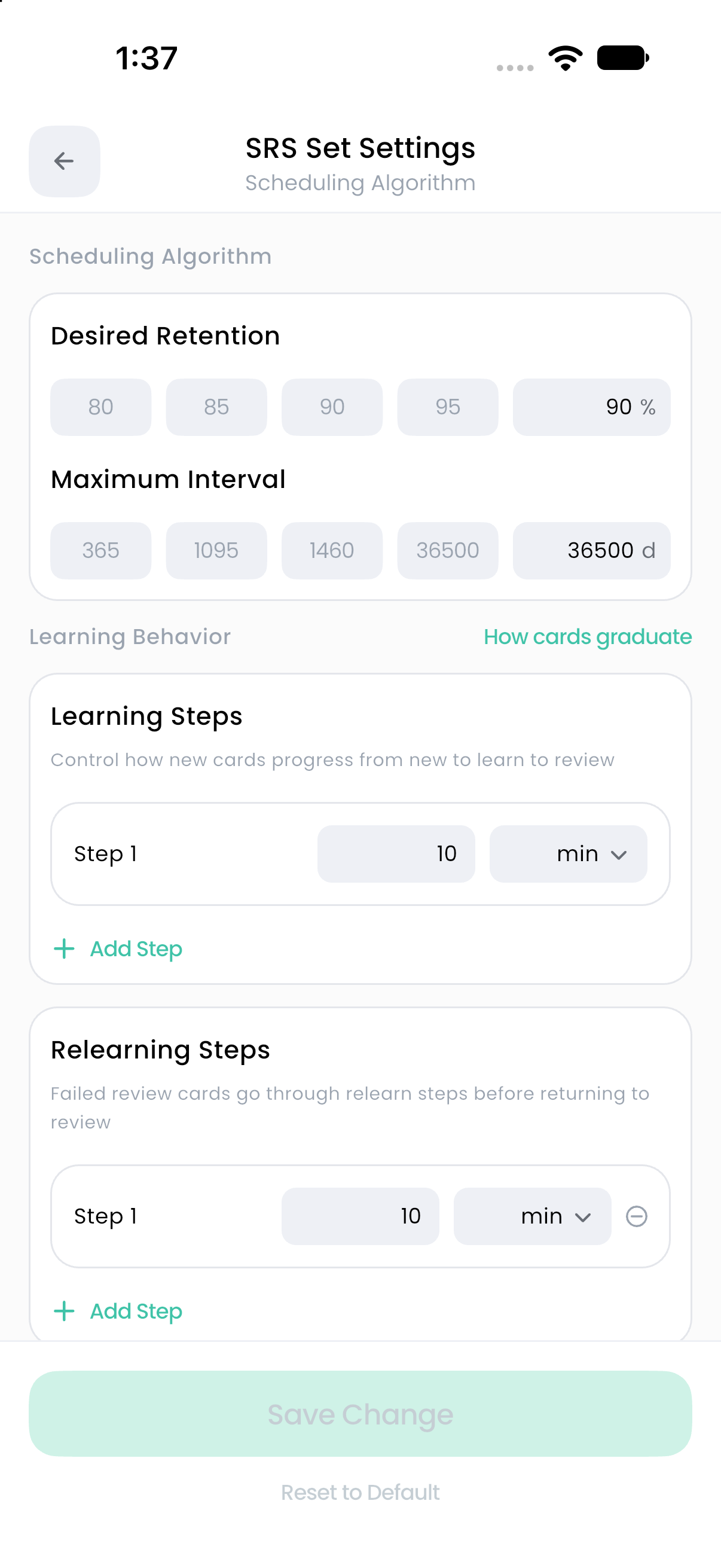
Desired Retention
Desired Retention is the scheduler's target recall probability at the next review. It is not a guaranteed score or a requirement to answer that percentage correctly today.
Increasing the target generally produces shorter review intervals and more work. Decreasing it generally permits longer intervals and more forgetting. Start with the default and examine your workload before making a large change. Changing the daily new-card allowance is a separate way to control how quickly the workload grows.
True Retention in Statistics describes observed answers. Estimated Recall is a model estimate. Neither should be read as another name for the Desired Retention setting. See Recall and knowledge statistics.
Maximum Interval
Maximum Interval caps the interval chosen for a card in Review. The default of 36,500 days is a high cap; it does not mean all cards will be scheduled that far away.
Choose a smaller cap only when you want to prevent very long intervals. Existing due dates are not a live preview of every settings edit; subsequent scheduling uses the applicable settings when you review.
Learning and graduation
New cards enter the learning sequence. Once a card reaches Review, its longer-term intervals are calculated from its history and answer grades.
Relearning is used after a Review card receives Again. If you configure no relearning steps, the scheduler returns it to Review without an intermediate relearning sequence.
Change a step sequence
- Open SRS Set Settings → Scheduling Algorithm.
- Under Learning Steps or Relearning Steps, choose Add Step or remove an existing step.
- Enter a positive length and choose its Time Unit.
- Confirm the sequence is nondecreasing. Correct any Input required or step-order message.
- Tap Save Change.
Changing a time unit can clamp a value to that unit's maximum. Recheck the value after switching units.
A card scheduled a few minutes ahead can appear before that exact time when your global Review Ahead Limit includes it. Check daily availability before assuming the learning step was ignored.
Advanced parameters
Desired Retention and learning steps are normal scheduling controls. The 21 values in Advanced Settings are model weights with a different purpose. You do not need to enter custom parameters to use SRS. See FSRS parameters.