

Cloze Deletion
Cloze Deletion hides selected parts of a sentence so you can recall the missing words in context. It is a Both Only field: the same text appears on both faces, masked before reveal and visible afterward.
Create a cloze card
- Choose a cloze template or add a Cloze Deletion field to a deck template.
- Open a card and enter a sentence, such as
Water freezes at 0 °C under standard atmospheric pressure. - Select
0 °Cin the editor. - Tap the cloze toggle in the keyboard toolbar to mark that selection.
- Use Full Preview to check the masked front and revealed back, then save the card.
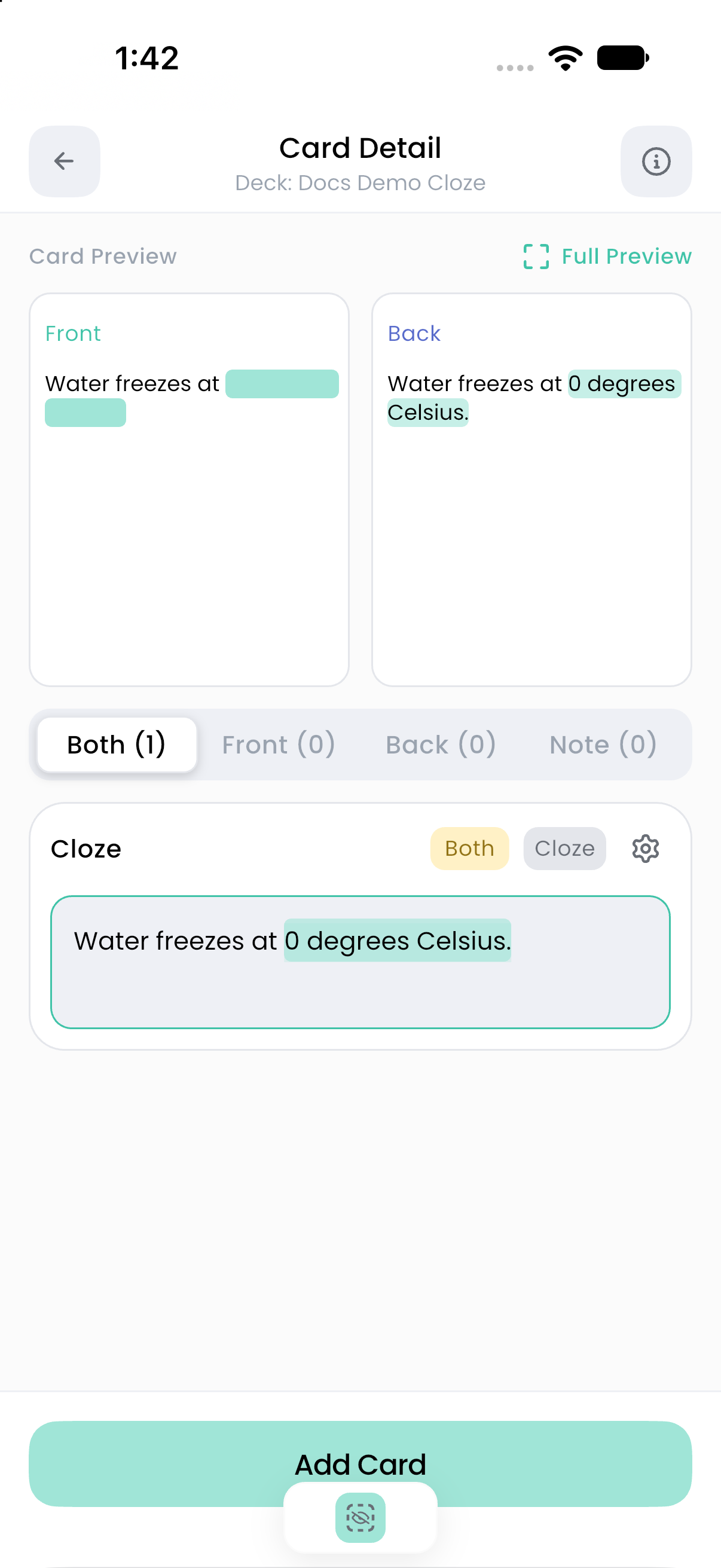
The editor marks ranges in your text; you do not need to type Anki-style {{c1::...}} notation to author a cloze in Flashnerd.
Edit the hidden text
Select a marked span and use the cloze toggle again to remove the marking. With the caret active, the toggle can also turn cloze typing on so newly entered text is marked. Check the toggle state when continuing to type after a hidden phrase.
You can mark more than one span in the field. They remain part of the same Flashnerd card; adding spans does not automatically create separate scheduled cards.
Make the question clear
Hide the smallest phrase that tests the fact you want to recall. If masking several facts makes the answer difficult to judge, create separate cards with one main recall task each.
A separate Note field can hold an explanation without exposing it as part of the question. Cloze text can also be used as a TTS source field; check whether audio would reveal the wording you are trying to recall.
For imported Anki cloze behavior, see Anki compatibility.